Blog / Cryptomator Hub 2.0.0: User Management and Emergency Access
With Cryptomator Hub 2.0.0, we’re releasing an update that’s especially exciting for teams, small businesses, and organizations: managing encrypted vaults becomes easier, more transparent, and more reliable.
Back in our post celebrating Cryptomator Hub’s 2nd birthday, we gave a preview of the features to come. Now they’re fully available. We’ll start with what’s new — and then, for everyone who doesn’t know Hub yet, explain what Cryptomator Hub actually is and why it’s worth it for teams.
What’s new in Cryptomator Hub 2.0.0?
Two areas are in focus: User & Group Management and Emergency Access.
User & Group Management: Manage users and groups directly in Hub
Until now, managing people and groups meant going through Keycloak. With version 2.0.0, it happens directly in the Cryptomator Hub interface — one tool switch less in your daily work.
- Create and manage users and groups directly in Hub
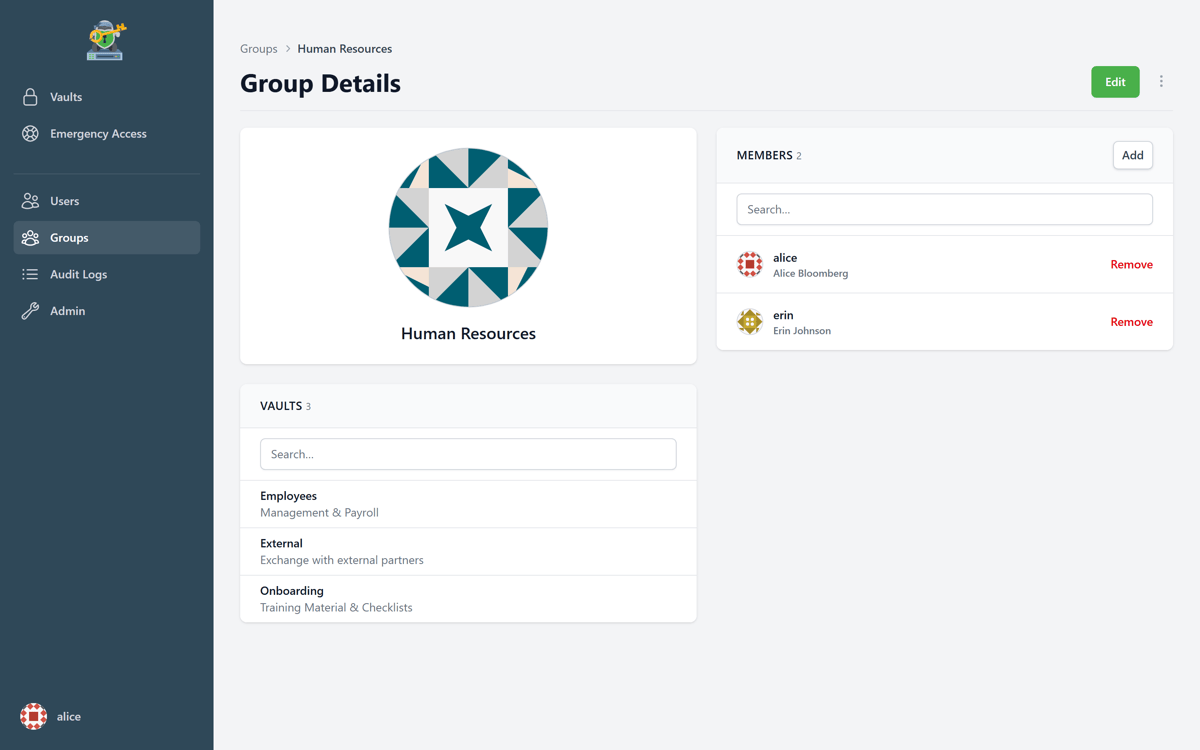
- Grant permissions via groups instead of maintaining every access individually
- Less administrative effort and less setup complexity
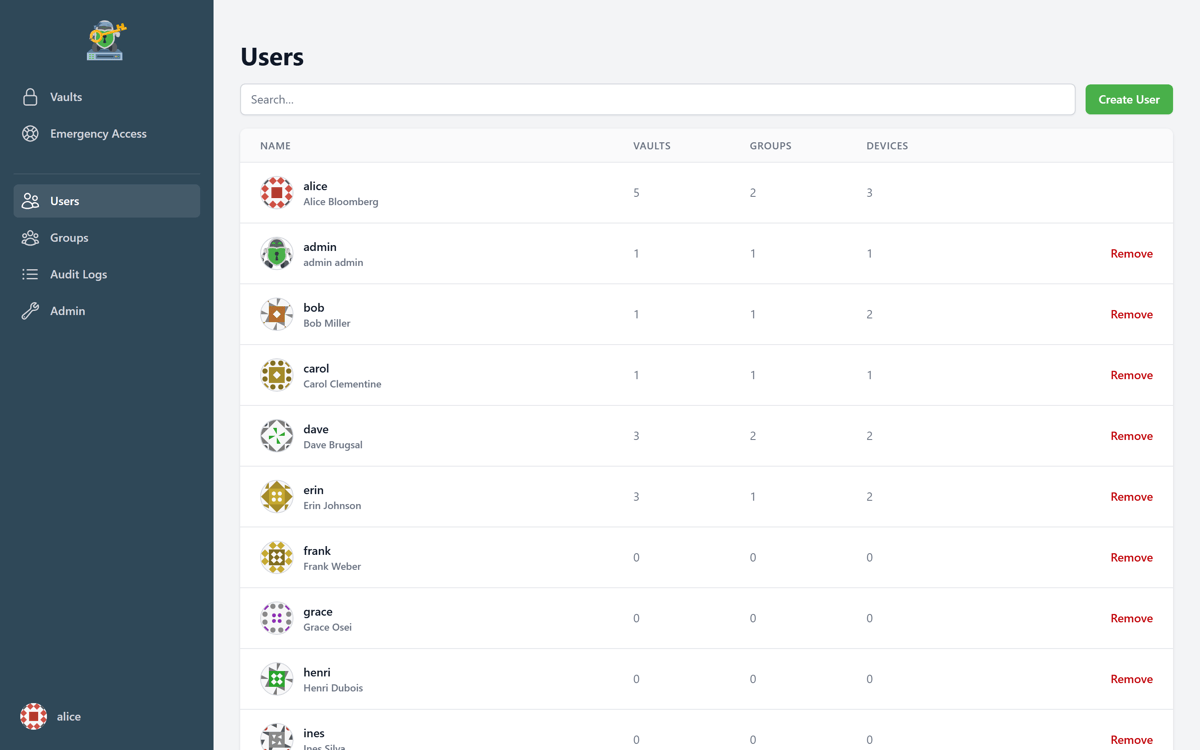
An example: in a small business, accounting needs access to financial records, HR to personnel records, and project teams to their respective working documents. Groups let you map structures like these instead of authorizing every person individually. New team members join the right group and get exactly the permissions they need. If someone changes roles or leaves the team, you adjust the group membership — done.
This helps small and medium-sized teams in particular, who don’t have dedicated IAM expertise in-house.
Emergency Access: Restore access when it matters
What happens when the person who owns a vault is on vacation, off sick, or no longer with the company?
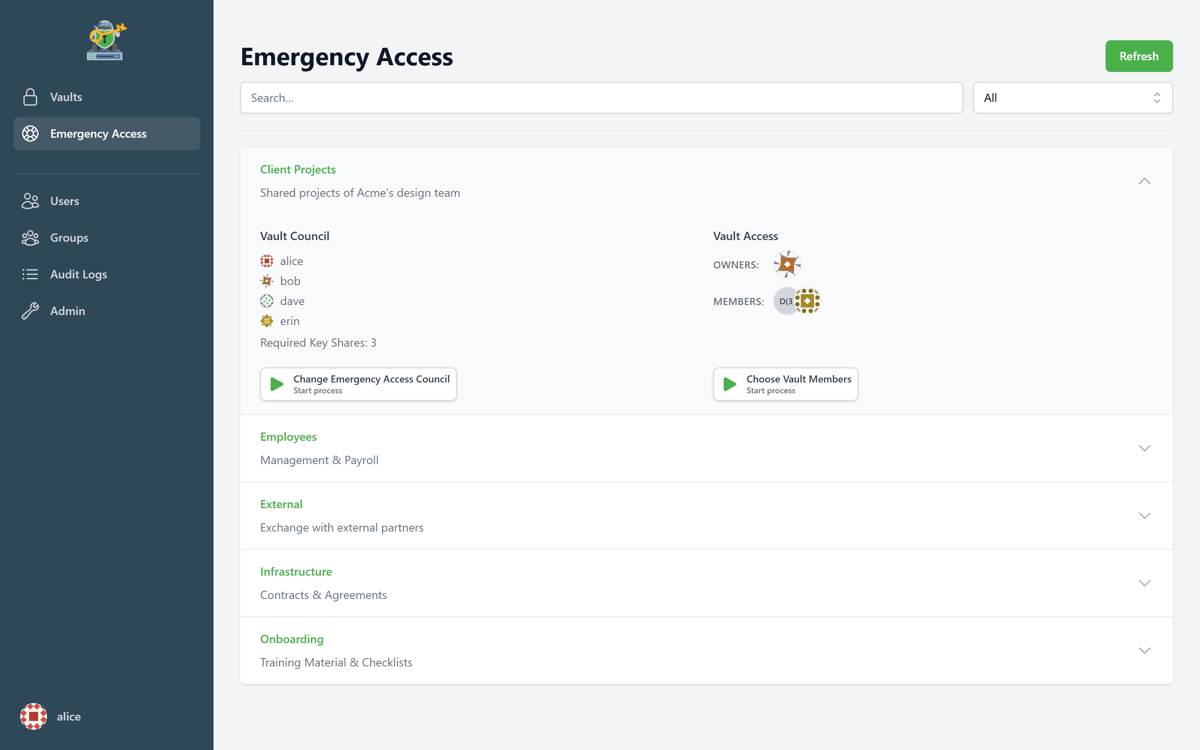
Emergency Access answers that without weakening the security model:
- Admins define a group of trusted people.
- Using multi-party approval, this group can restore access to a vault.
- Recovery therefore always involves several people — no single person can grant themselves access.
Emergency Access is part of the Enterprise plan.
For business-critical data, that’s an important building block. Because encryption must not mean that a company becomes unable to act in an emergency.
How to get the update
If you host Cryptomator Hub yourself, update your instance to version 2.0.0 and follow the steps in the release notes.
If you use a managed instance, we’ll take care of the update for you and get in touch with the exact maintenance window in advance.
What is Cryptomator Hub?
Cryptomator Hub is our solution for encrypted collaboration within teams. While the classic Cryptomator app is designed to let individuals encrypt their files client-side and store them securely in the cloud, Hub brings this principle to teams and organizations.
You create encrypted vaults for your teams, manage access rights centrally, and keep using the cloud storage of your choice: OneDrive, Google Drive, Dropbox, Nextcloud, or any other provider. The files stay wherever you store them — Hub takes care of access control and key management, but never becomes the storage location for your data itself.
The Cryptomator app remains the application you use to open and work with your vaults locally. Hub doesn’t replace it; it extends it with what teams additionally need. The core principle stays the same: your data is encrypted client-side. Neither cloud providers nor unauthorized people can read your files in plaintext.
Why not just use the Cryptomator app in a team?
The classic Cryptomator app is ideal for individuals. In principle, a vault can be used by several people, too — but in practice that means a password has to be shared.
And shared passwords are always problematic in teams: they get passed on through chats or password managers without it staying clear who actually still knows them. They’re nearly impossible to revoke. If someone should no longer have access, removing them from a group isn’t enough — the password would have to be changed and redistributed to everyone who’s authorized.
On top of that come questions that a commonly known password simply can’t answer:
- Who is allowed to access which vault?
- How do you add new people and reliably lock out those who leave?
- How do you keep administration manageable when multiple teams, departments, or projects are involved?
- What happens when a responsible person no longer has access?
That’s why Cryptomator Hub organizes access not through a shared password, but through individual accounts, roles, and permissions. Each person works with their own access, and access can be granted and revoked in a targeted way.
Who actually holds the keys?
Confidential information — customer data, contracts, financial and HR records, internal strategy documents — mostly lives in the cloud today. That’s convenient, because teams can work flexibly and collaborate across locations. At the same time, the question arises: who can actually see this data?
Cloud providers do have their own security mechanisms, but not every kind of encryption is the same. In many cases, data is stored encrypted, but the keys are held by the provider itself. Technically, it has the ability to decrypt the content — if it wants to or is compelled to do so.
That’s why Cryptomator Hub brings client-side encryption into the team context: the data is encrypted before it reaches the cloud. Only authorized people can get to the content. That makes Hub interesting for organizations that want the convenience of the cloud without giving up the confidentiality of their data.
Why Hub is especially useful for small teams
Small teams and businesses often face a dilemma: they want to protect sensitive data, but they don’t have a large IT department, complex security infrastructure, or a dedicated compliance team. That’s exactly where Hub plays to its strengths.
1. Individual access instead of shared passwords
Every person has their own access. That pays off above all during offboarding: when someone leaves the company, access is revoked centrally — without having to reorganize a vault or redistribute a password.
2. Structure instead of one vault for everything
A single vault is enough for individuals. Teams usually need several areas: for management, accounting, marketing, or individual customer projects. With Hub, these become separate vaults that are shared in a targeted way. That way, each person only gets access to the data they really need — as much as necessary, as little as possible.
3. Security that doesn’t get in the way
In small teams, security is often organized on the side. If access control is complicated, it gets bypassed. Hub makes the secure option the practical one: users log in, open their shared vaults, and work with their files — without exchanging passwords or having to understand technical details.
4. Free choice of cloud storage
Hub doesn’t dictate which cloud storage you have to use. It adds an extra layer of security to your existing infrastructure instead of replacing it.
5. Zero-knowledge: we can’t see your data either
Hub manages access and key material in such a way that encrypted collaboration becomes possible without any central entity — including us — getting to your unencrypted content. That’s the zero-knowledge principle. And because Hub is open source, it can be verified.
Typical use cases
Cryptomator Hub is a good fit wherever teams work together with sensitive files:
- Small businesses with confidential contracts, financial data, and customer data
- Agencies and project teams that share a separate vault per customer or project
- NGOs that work in distributed teams and handle donor data or personal data
- Research and education with sensitive research data and internal documents
- Works councils and confidential committees, where data access has to be clearly limited
Conclusion
The more sensitive the data in the cloud, the more important the question of who really has access to it. With Cryptomator Hub, teams keep that control — and with version 2.0.0, administration becomes considerably easier: the new User & Group Management brings people, groups, and permissions together in one place, and Emergency Access makes sure nobody stays locked out when a responsible person is unavailable.
For individuals, the classic Cryptomator app remains the right choice. For teams, small businesses, and organizations, Hub is the next logical step.
Have questions about Hub for your team? Contact us.