Sicherheitslücke beim Entsperren von Hub-Tresoren: Update Erforderlich
Wir haben ein wichtiges Sicherheitsupdate für alle Cryptomator-Client-Apps veröffentlicht, das eine Schwachstelle behebt, die alle Nutzer betrifft, die Hub-verwaltete Tresore entsperren.
Erforderliche Maßnahme
Bitte aktualisiert umgehend alle Cryptomator-Client-Anwendungen, die auf Hub-verwaltete Tresore zugreifen, auf die korrigierten Versionen:
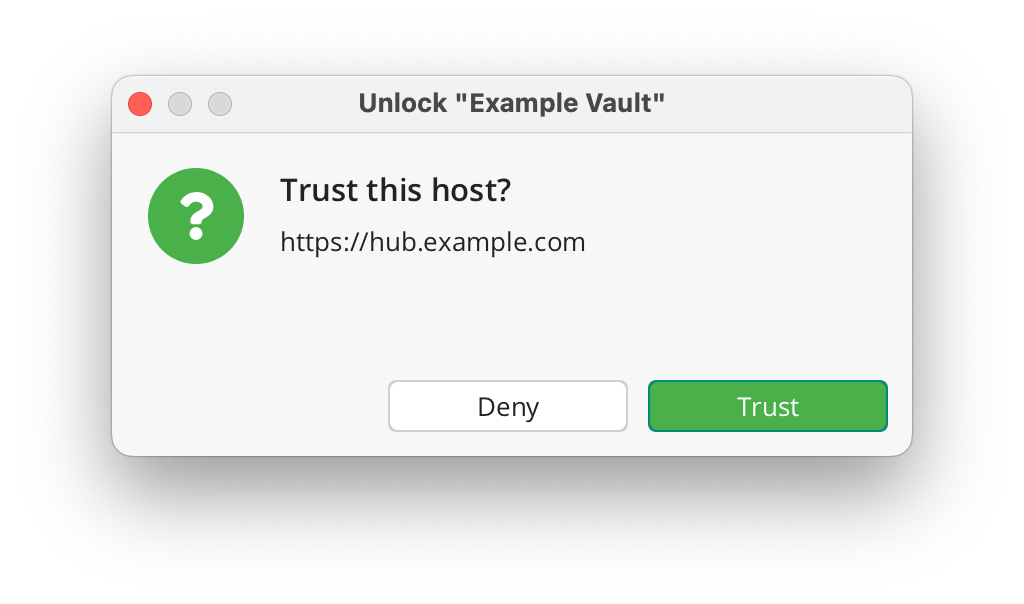
Nach dem Update zeigen Cryptomator-Clients, die sich mit selbst gehosteten Hub-Instanzen verbinden, einmalig einen „Diesem Host vertrauen?"-Dialog an, der individuell bestätigt werden muss. Bitte überprüft vor der Bestätigung, dass die angezeigte Hub-URL korrekt ist und mit eurer Cryptomator-Hub-Instanz übereinstimmt. Clients, die sich mit Cryptomator Hub Managed verbinden, sind von diesem Dialog nicht betroffen, da verwaltete Domains automatisch als vertrauenswürdig eingestuft werden.
Sind meine Tresore sicher?
Ja. Da Cryptomator Hub Ende-zu-Ende-Verschlüsselung verwendet, waren Tresordaten zu keinem Zeitpunkt in Gefahr.
Welche Tresore sind betroffen?
Die Schwachstelle befindet sich im Entsperr-Workflow von Hub-verwalteten Tresoren. Lokale Tresore sind nicht betroffen.
Welche Daten sind gefährdet?
Ein Angreifer mit Schreibzugriff auf die verschlüsselten Daten könnte den Tresor so manipulieren, dass Cryptomator ein Session-Token an einen bösartigen Server sendet. Das abgegriffene Token kann dann verwendet werden, um sich als Nutzer auszugeben und auf unverschlüsselte Informationen wie Benutzernamen, Tresornamen usw. in Hub zuzugreifen.
Wurde die Schwachstelle ausgenutzt?
Zum jetzigen Zeitpunkt liegen uns keine Hinweise auf eine aktive Ausnutzung dieser Schwachstelle vor.
Sicherheitshinweise
Im Rahmen der verantwortungsvollen Offenlegung werden die vollständigen Sicherheitshinweise am 20. März veröffentlicht. Bis dahin sind die folgenden Links noch nicht erreichbar — das ist beabsichtigt:
Bei weiteren Fragen oder wenn ihr Unterstützung beim Update benötigt, zögert nicht, uns unter [email protected] zu kontaktieren.
Vulnerability in iOS Version 2.0.0–2.0.3 (Please update to 2.0.4)
We always claimed that if there once were a security issue with Cryptomator, we’d be unable to hide it. Now it happened: A user reported an issue in our iOS app that we consider severe.
While such issues can happen in any type of project (as recently demonstrated by infamous bugs in log4j and Exchange), users of open-source software can at least rely on known vulnerabilities not being kept secret for marketing purposes.
In this spirit, we want to share with you all the details of this vulnerability.
What happened?
When decrypting files for the iOS Files app, the cleartext file needs to be physically stored on the file system and a path leading to this file is handed over to the Files app.
If iCloud Backup is enabled on this device, the cleartext file is included in the backup, effectively leaking it to Apple.
What files are affected?
Only files that you actually opened from within the Files app have been decrypted. All remaining vault contents are unaffected.
Furthermore, the device needs to have made an iCloud Backup while a vulnerable version has been in use (2.0.0 released 2021-12-21, fixed in 2.0.4 released 2021-12-26).
If iCloud Backup is disabled, no decrypted files left your device.
Can leaked files be deleted from existing backups?
Yes, the vaults themselves are still fully protected, regardless of which cloud storage is being used.
Why is there decrypted data in the first place?
At some point, you need to have cleartext data, otherwise you can’t work with them. Cryptomator is fully integrated into the Files app, which means that it is bound to and limited by the File Provider Extension API. It requires to have readable (cleartext) data readily available. Keep in mind that Cryptomator’s target is to ensure privacy in the cloud and not on the device itself.
Are there any other plans regarding the local cache?
We are currently investigating if we can shorten the lifetime of decrypted data. As mentioned before, mechanisms that affect the File Provider Extension are out of our hands. But for example, clearing the cache after the vault has been locked in combination with auto-lock can certainly be helpful if you’d like to tighten the longevity of decrypted data.
How does the development team make sure to avoid issues?
While claiming to write bug-free software would be a blatant lie, we can promise to do our best to avoid such vulnerabilities.
But all the best practices, automated code analysis, highest test coverage and consulting external experts doesn’t help to rule out all possibilities, especially when caused by interaction with a third-party tool.
The rewritten iOS app has been tested by more than 2,300 beta testers over a period of half a year. After all, it was just very bad luck that this issue has not been discovered during this beta.