Cybercrime in 2025: What Businesses Can Learn from Germany's BKA Report
Cyberattacks are no longer the exception. They have become part of the everyday threat landscape for businesses, organizations, and public institutions. This is also evident in the latest report from Germany’s Federal Criminal Police Office (Bundeskriminalamt, or BKA), its “Federal Cybercrime Situation Report 2025.” While the report focuses on Germany, the trends it describes are playing out internationally: cybercrime is becoming more professional, scalable, and potentially more damaging for those affected. Ransomware, data extortion, phishing, and the misuse of artificial intelligence are particularly defining the current landscape.
This raises a key question for companies: How can sensitive data be protected when attacks are increasingly targeting not just systems, but the information itself?
Cybercrime Remains at High Levels
The Federal Situation Report shows that cybercrime continues to pose a significant threat in Germany. For the year 2025, the Federal Criminal Police Office (BKA) reports a total of 333,922 cybercrime cases when domestic and foreign offenses are considered together. It is particularly noteworthy that foreign offenses, at 207,888 cases, significantly outnumber domestic offenses. This illustrates the extent to which cyberattacks are organized across borders and how difficult it can be to prosecute them under criminal law.
The economic damage is also enormous. According to the Bitkom survey cited in the report, cyberattacks caused damage to the German economy amounting to approximately 202.4 billion euros. This means that cyberattacks account for a significant portion of the total losses incurred by companies due to theft, espionage, and sabotage.
These figures show that cybersecurity is not just an IT issue. It affects the entire organization—from management and the IT department to specialized departments that work with sensitive data on a daily basis.
Ransomware Remains a Major Threat
Ransomware remains one of the greatest threats. The BKA continues to describe attacks involving encryption trojans as a major threat to businesses and public institutions. In 2025, 1,041 ransomware attacks were reported across Germany—an increase of about ten percent compared to the previous year.
It is particularly striking that the majority of these attacks target organizations: According to the report, around 96 percent of ransomware attacks targeted companies, organizations, and institutions. About 90 percent were directed at small and medium-sized enterprises.
This is an important point. Cybercriminals do not only attack large corporations with massive IT budgets. Small and medium-sized organizations, in particular, are increasingly being targeted because they often possess valuable data but do not always have the resources for complex security architectures.
Typical examples include:
Customer data
Contract documents
Financial data
Research data
Personnel files
Internal strategy and project documents
Sensitive data from clients, patients, members, or partner organizations
Such information is particularly valuable to attackers. And that is precisely why it is no longer enough to simply secure systems. The data itself must also be protected.
From Ransomware to Double Extortion
In the past, ransomware primarily focused on encrypting systems. Attackers blocked access to files and demanded a ransom for their restoration. Today, this model has become significantly more dangerous.
The BKA points out that a large proportion of ransomware attacks can be attributed to the “double extortion” modus operandi. In this scenario, attackers not only encrypt systems but also copy data from the affected environment beforehand. They then threaten to publish or sell this information.
For companies, this shifts the risk. It is no longer just a matter of whether data can be restored from a backup. It is also a matter of whether sensitive information has already been leaked—and whether attackers can read, analyze, and use it against the organization.
Backups remain important, of course. They help restore operations after an attack. But they do not solve the problem of data exfiltration. If confidential data has been copied in unencrypted form, a backup cannot prevent reputational damage, legal risks, or potential data breaches.
This is precisely where data-level encryption becomes crucial.
Data Extortion Is on the Rise
The report makes it clear that, alongside traditional ransomware, another modus operandi is taking hold: data extortion. In some cases, attackers even forego encrypting systems and instead focus directly on extracting sensitive data and then blackmailing victims by threatening to publish it.
This is a significant development. It shows that cybercriminals are targeting the area where the pressure on companies is greatest: confidential information.
If sensitive data falls into the wrong hands, the threat is not limited to short-term business disruptions. Companies must also expect long-term consequences:
Loss of customer trust
Damage to reputation
Data breach notifications and potential fines
Legal disputes
Disclosure of internal information
Endangerment of partners, employees, or affected individuals
Blackmail through threats of further disclosures
The more sensitive the data, the greater the pressure. For NGOs, universities, research institutions, works councils, law firms, consulting firms, healthcare organizations, or social service providers, such a data breach can be particularly severe.
AI Makes Attacks Faster and More Convincing
Another key focus of the Federal Situation Report is the use of artificial intelligence. The BKA notes that AI lowers the technical barriers to entry for cybercrime and can make attacks more efficient, faster, and more credible.
This is particularly evident in phishing. AI can help create deceptively authentic emails: linguistically flawless, well-translated, personalized, and written in the style of well-known companies or internal communications. This makes phishing attacks harder to detect.
But the report goes even further. AI can also assist in the strategic reconnaissance of target systems, the identification of vulnerabilities, and the analysis of large amounts of data. In the context of ransomware, this can mean that attackers can more quickly identify which files are particularly sensitive, confidential, or business-critical.
This changes the defense landscape. Organizations must assume that, in the future, attackers will not only be able to steal more data but also analyze it more quickly and use it in a more targeted manner for extortion.
Why Cloud Data Requires Special Protection
Many companies and organizations now operate in the cloud. Files are stored in cloud storage, shared among teams, and edited from various locations. This is efficient and has become indispensable for modern collaboration.
At the same time, new risks are emerging. The more sensitive data is stored in cloud environments, the more important the following question becomes:
Who can access this data—and in what form is it stored there?
Account security, multi-factor authentication, and role-based permissions are important protective measures. But they should not be the only lines of defense. Phishing, compromised credentials, misconfigurations, or unauthorized access can all lead to attackers gaining access to cloud files.
If this data is stored in plain text, it is immediately usable. If, on the other hand, it has been encrypted on the client side, an additional layer of protection is created. Attackers cannot then easily read the files, even if they gain access to the storage location.
What Role Cryptomator Hub Can Play in This
This is exactly where Cryptomator Hub comes in. The solution helps teams and organizations store sensitive data in the cloud in an encrypted format and manage access centrally.
It’s important to understand the distinction: Cryptomator Hub is not anti-ransomware software, a virus scanner, or DDoS protection. In other words, the solution does not prevent attackers from sending phishing emails, developing malware, or attacking infrastructure.
The added value lies on a different level: Cryptomator Hub protects data where it is most at risk—in day-to-day collaboration, in cloud storage, and in shared work environments.
This is particularly relevant in four scenarios:
1. Protection Against Exploitable Data Leaks
When attackers attempt to copy data from cloud storage, encryption determines whether that data is readable to them. Client-side encryption ensures that files are encrypted before they are stored in the cloud.
This is a crucial factor in data extortion. Stolen data is only valuable for blackmail if it can be analyzed and published.
2. Access Control for Teams
In organizations, data must be shared—but not all data with everyone. Cryptomator Hub enables structured management of access rights for teams. This allows for better control over who has access to specific vaults and sensitive information.
This is particularly important for organizations with multiple departments, project teams, or external stakeholders.
3. Complementing Existing Security Measures
Cryptomator Hub does not replace a comprehensive security strategy. It complements it. A robust cybersecurity strategy should combine multiple layers:
Awareness and training
Phishing protection
Strong passwords and multi-factor authentication
Endpoint security
Regular updates
Backups
Permissions and role management
Incident response
Encryption of sensitive data
In this model, Cryptomator Hub primarily strengthens the data confidentiality layer.
4. Practical Solution for Smaller Organizations
Since the report indicates that SMEs in particular are heavily affected by ransomware, practical implementability is a key factor. Not every organization can build complex enterprise security infrastructures. At the same time, smaller teams must also protect sensitive data.
Cryptomator Hub can be positioned here as a low-threshold, team-friendly solution: Cloud data remains accessible but is protected by additional encryption.
Conclusion: Cybersecurity Must Start With the Data
The 2025 Federal Cybercrime Situation Report makes it clear that companies should no longer view cyberattacks solely as a technical risk. The key question is no longer simply whether an attack can be repelled. It is also crucial to consider how capable an organization remains of functioning if an attack is successful.
This is precisely where the perspective on data security is shifting. When attackers copy, analyze, and use sensitive information as leverage, the confidentiality of this data becomes a central component of an organization’s own resilience. Those who store confidential information unprotected in cloud environments rely on all upstream protection mechanisms functioning at all times. However, the current threat landscape shows that this assumption is risky.
Companies therefore need security strategies that not only prevent attacks but also limit their consequences. This includes consistently protecting sensitive data in such a way that it cannot be immediately exploited in the event of an emergency. Encryption is not an additional measure for particularly cautious organizations, but a fundamental building block of modern cyber resilience.
This is exactly where Cryptomator Hub comes in: The solution helps teams encrypt sensitive cloud data on the client side and manage access centrally. While it doesn’t protect against every form of cyberattack, it strengthens a crucial line of defense—the data itself.
After all, the more cybercrime focuses on the theft and publication of sensitive information, the more important a simple fact becomes: Data that attackers cannot read loses a large part of its potential for blackmail.
World Password Day 2026: Why Strong Passwords Are No Longer Enough
For years, World Password Day has promoted a simple message: use strong passwords, don’t reuse them, use a password manager, and enable two-factor authentication and passkeys whenever possible.
These recommendations are still sound. At the same time, it is becoming increasingly clear that they are no longer sufficient to meet the needs of many organizations. The conversation has shifted: it’s no longer just about making passwords better. Increasingly, the focus is on how to reduce reliance on passwords overall.
This is particularly relevant for companies and teams. Here, passwords are not just an individual security risk, but an organizational factor. They must be managed, reset, protected, and, in a team context, frequently integrated into existing processes.
Why Passwords Have Their Limitations in Practice
Passwords have been the standard for digital access for decades. The fundamental problem, however, lies not only in weak or reused passwords, but in the principle itself: a password is a secret that can be discovered, shared, or stolen.
In organizations, there is the added complication that access cannot be viewed in isolation. As soon as multiple people are involved with the same data, projects, or processes, additional administrative overhead and new vulnerabilities arise: shared vault passwords in notes or phishing emails that compromise a single password and thereby expose entire data sets.
Stricter password rules alone do not solve this problem and have long since ceased to be recommended. What is needed is a security model that fits modern collaboration—one that ties access not primarily to shared secrets, but to verifiable identities and clear permissions.
The Unique Challenge of Confidential Cloud Collaboration
Many teams today work with sensitive data in cloud environments: contracts, personnel records, customer data, internal strategy documents, and research data. This information must be accessible during day-to-day operations—while at the same time remaining reliably protected against unauthorized access.
This creates a dilemma: Authorized users must be able to access the data easily. However, security must not depend on passwords being manually distributed, kept up to date, or laboriously adjusted whenever personnel changes occur. This is precisely where it becomes clear that password security alone is no longer sufficient. What matters is how access is organized and controlled overall, and whether the data ends up in plain text with a cloud provider or on a network drive in the first place.
What Role Cryptomator Hub Plays in This
Cryptomator Hub addresses this issue by providing a structured framework for encrypted collaboration among teams. The focus is on encrypted vaults and identity-based access rights rather than shared passwords and access permissions. Cryptomator Hub consistently follows the zero-knowledge principle: content is encrypted and decrypted exclusively on users’ devices; the Hub server itself never has access to the plaintext data or the underlying keys.
With Cryptomator Hub, team vaults are provisioned, and it is determined which users or groups are permitted to access them. Access is not controlled via a shared vault password, but through the organization’s existing identity management system. Common identity providers such as Keycloak or Microsoft Entra ID can be integrated via OpenID Connect. This shifts the focus from “Who knows the password?” to “Who has access and under what permissions?”
For teams, this is a significant difference. Permissions are managed in the IdP and are therefore auditable. When someone leaves the team, the offboarding process in the IdP automatically revokes access—eliminating the need for manual distribution, documentation, or rotation of vault passwords.
Also Suitable for Small Teams Without Their Own It Department
Not every organization has an IT department—and not every team wants to deal with terms like OpenID Connect or Identity Provider. A dental practice, a law firm, or a small consulting firm works with highly sensitive data, but usually doesn’t have anyone on staff who would set up a complex security infrastructure.
Cryptomator Hub is designed for such teams as well. No separate identity management system is required: Hub comes with preconfigured user management, allowing users to be created directly, groups to be formed, and vaults to be assigned. This is done via a web interface, without a command line and without any prior knowledge of identity or key management.
In practice, this means: Colleagues are invited and assigned the appropriate vaults. From that moment on, all authorized users can access shared patient records, client data, or project documents in an encrypted manner—via the cloud that is already in use. If someone leaves the team, their account can be deactivated in the Hub interface, and access is revoked. There is no shared password that anyone could still know afterward. This is because everyone has their own password, including multi-factor authentication (MFA) or a passkey.
It’s important to note that even in this simple setup, the zero-knowledge principle applies without exception. Even if user management is handled through the included Hub component, the content remains unreadable to cloud providers, Hub operators, and Skymatic alike.
This makes Cryptomator Hub ideal for e.g., medical practices and small offices that take their GDPR obligations seriously but lack both the budget and the time for a large-scale IT project.
Security requires verifiability. Cryptomator is open source: the code is publicly available on GitHub and has undergone independent security audits. This means that IT managers don’t have to rely on marketing promises; instead, they can verify the cryptographic implementation themselves—or have it verified. Cryptomator Hub is built on the same open-source foundation. This means that the zero-knowledge promise is not merely a marketing claim, but an architectural feature that can be verified in the code.
Furthermore, Cryptomator Hub is developed in Bonn, Germany. The architecture has been designed from the outset to meet European data protection requirements. Since content is encrypted on the end device, unencrypted personal data never leaves the organization’s sphere of responsibility.
Security solutions are only effective if they can be integrated into real-world workflows. If security measures become too complicated in everyday use, workarounds and manual bypasses will emerge.
Beyond World Password Day
World Password Day is a good opportunity to think about secure access. For organizations, however, the discussion shouldn’t stop at password policies. After all, when multiple people are working with sensitive data, security becomes a matter of access control, management processes, and technical architecture.
Strong passwords remain important, but they are no longer sufficient for modern teams. In addition to secure login credentials, authorization management, identity-based authentication, and a robust encryption concept are essential—ideally one that operates on the zero-knowledge principle and does not make confidentiality dependent on the cloud provider’s good faith.
This is exactly where Cryptomator Hub comes in: zero-knowledge encryption on end devices, combined with identity-based access control—open source and developed in Germany. If your team processes sensitive data in existing cloud services and is looking for a security model that doesn’t weaken with every shared password, it’s worth taking a closer look at Cryptomator Hub.
Security Vulnerability in Hub Vault Unlock: Update Required
We have released an important security fix for all Cryptomator client apps, which fixes a vulnerability affecting all users who unlock Hub-managed vaults.
Required Action
Please update all your Cryptomator client applications that access Hub-managed vaults immediately to the fixed versions:
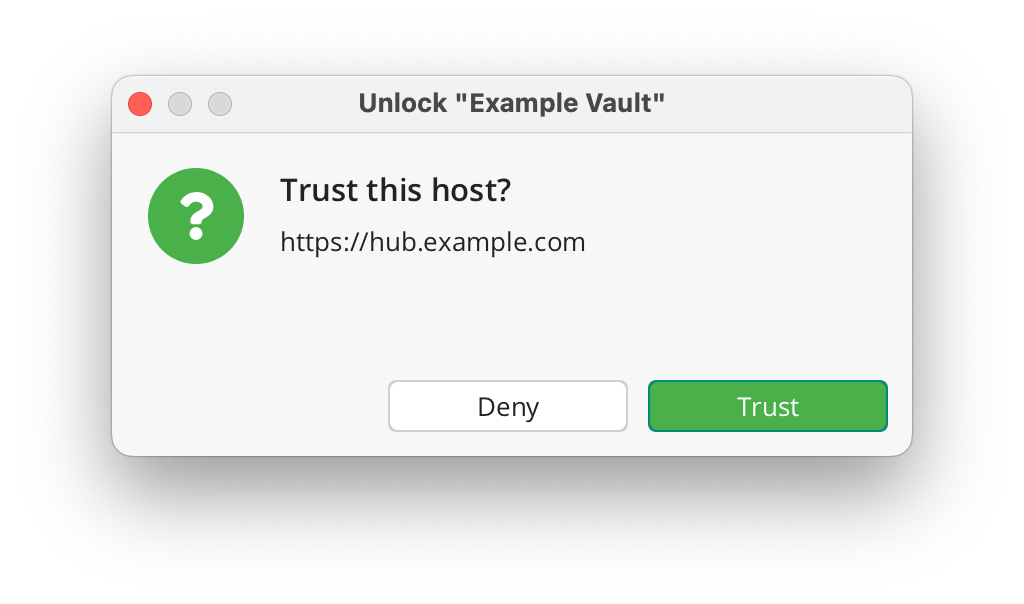
After the update, Cryptomator clients connecting to self-hosted Hub instances will show a one-time “Trust this host?” dialog that must be confirmed individually. Before accepting, please verify that the displayed Hub URL is correct and matches your Cryptomator Hub instance. Clients connecting to Cryptomator Hub Managed are not affected by this dialog, as managed domains are trusted automatically.
Are my vaults safe?
Yes. Since Cryptomator Hub uses end-to-end encryption, vault data was never in danger.
Which vaults are affected?
The vulnerability lies within the unlock workflow of Hub-managed vaults. Local vaults are unaffected.
What data is at risk?
An attacker with write access to your encrypted data could tamper the vault in a way that makes Cryptomator send a session token to a malicious server. The exfiltrated token can then be used to impersonate a user to access unencrypted information like usernames, vault names, etc. in Hub.
Has this been exploited?
At this time, we have no evidence of active exploitation of this vulnerability.
Security Advisories
As part of responsible disclosure, the full security advisories will be published on March 20. Until then, the following links will not work yet — this is expected and intentional:
If you have any further questions or need assistance during updates, don’t hesitate to contact us at [email protected].
Confidentiality Is a Must: Why Works Councils Need Encryption
Works councils play a central role in companies when it comes to protecting the interests of employees. In doing so, they process particularly sensitive data on a daily basis: personal complaints, election results, meeting minutes, or confidential agreements with trade unions. All of this information is not only subject to a moral obligation of confidentiality—it also falls under the strict requirements of the GDPR.
But how can a works council fulfill this responsibility in the digital age, when documents are often stored, shared, and edited collaboratively in the cloud? The answer lies in a combination of technical security, organizational processes, and the right tools.
Sensitive Data Requires Special Protective Measures
Personnel data, sick notes, conflict discussions, internal processes—works councils have deep insights into the innermost workings of the company. This information concerns not only labor law disputes or restructuring, but also very personal situations in the lives of employees.
The GDPR requires such personal data to be protected with appropriate technical and organizational measures. This explicitly includes encryption. This measure is not an optional extra, but a central component of works council work that complies with data protection regulations.
Why Encryption Is Not Always the Same
Many companies today already rely on cloud-based systems such as Microsoft 365 or Google Workspace. These solutions advertise built-in security and encryption. However, what many people don’t know is that this often involves server-side encryption, which means that although the data is encrypted, the provider or administrator has the keys. Anyone who has access to the system can also access the data. This applies in particular to internal company administrators or external service providers.
This is not sufficient for particularly sensitive information, such as that processed by works councils. End-to-end encryption is required here: only authorized persons can access the content – even cloud providers or central IT departments have no access. The key to access remains exclusively with the works council.
Digital Sovereignty With Cryptomator Hub
Cryptomator Hub provides works councils with a tool that meets precisely these requirements. The solution enables the creation of encrypted data rooms (known as vaults) that can be used on any common cloud platform – while remaining entirely under the control of the council.
Vaults can be structured according to topics, roles, or working groups – for example, for minutes, election documents, complaints, or legal advice. Access rights can be assigned granularly via a clear interface. For example, only the election committee is authorized to access election documents, while other members have access to general meeting minutes.
Another advantage: the Web of Trust principle allows the committee to integrate new devices and members on a trust basis – without any central IT management or external administration. This is how digital self-administration becomes a reality.
Integration Without IT Dependency
A common obstacle for works councils is their dependence on their employer’s IT infrastructure. What if the company itself provides the cloud platform? Or what if the works council does not operate its own technical infrastructure?
Cryptomator Hub works independently of the underlying cloud. This means that even if the company provides Dropbox, OneDrive, or Nextcloud, the works council can securely encrypt its content without the employer having access. Control over the key and access structure remains exclusively with the committee.
It can also be used on private devices, which is an important factor for smaller works councils or committees without their own office infrastructure.
Conclusion
Confidentiality is not a nice-to-have, but a legal obligation and a responsibility that must be upheld. Works councils facing digital transformation should view the protection of sensitive data as a key requirement—not only to comply with legal requirements, but also to maintain the trust of the workforce.
With end-to-end encryption and independent tools such as Cryptomator Hub, works councils can fulfill this obligation securely, easily, and independently. And in doing so, they can send an important message: for digital maturity, for data protection, and for modern co-determination on an equal footing.
Two Years of Cryptomator Hub – Team Encryption Reimagined
On November 2, 2023, Cryptomator Hub 1.0 was released—our solution for secure, encrypted collaboration in the cloud. Two years later, Cryptomator Hub has become a central tool for companies, universities, and NGOs that want to protect their sensitive data while working efficiently as a team.
On this anniversary, we look back on two exciting years full of further developments, beta features, new areas of application—and what’s yet to come.
What is Cryptomator Hub?
Cryptomator Hub is the central platform for managing and sharing encrypted vaults.
While the classic Cryptomator app allows individuals to protect their cloud files, the Hub extends this principle to teams and organizations.
Cryptomator Hub offers a web-based dashboard that administrators and team members can use to manage users, assign roles, and control access rights—all fully encrypted and GDPR-compliant.
Cryptomator Hub thus bridges the gap between strong end-to-end encryption and user-friendly teamwork.
Features That Make the Difference
Centralized Management of Users and Permissions Whether you’re a small team or a large organization, administrators can always keep track of who has access to which vaults. Role-based permissions make management easy and transparent.
Web of Trust This security model enables secure key exchange between team members via digital trust relationships. No unencrypted data exchange and no complicated key files, as trust is mapped technically.
Create Vault Role Teams can independently create new vaults without administrators having to accompany each step. This keeps collaboration flexible while maintaining a high level of security.
Self-Hosting & Data Protection by Design Data protection is not an add-on, but a core principle: Cryptomator Hub can be operated locally (on-prem) or in private cloud environments. This gives companies and institutions complete control over their infrastructure and data.
Integration with Popular Cloud Services Whether OneDrive, Google Drive, Dropbox, or Nextcloud, Cryptomator Hub integrates seamlessly into existing work environments and protects data regardless of the provider.
Typical Areas of Application
Companies and Public Authorities
Companies use Cryptomator Hub to implement zero-trust security strategies. Industries with high compliance requirements—such as healthcare, public administration, and legal services—benefit particularly from GDPR-compliant cloud encryption.
Companies such as Walbusch GmbH & Co. KG are already successfully using Cryptomator Hub and can report consistently positive results:
With Cryptomator Hub, we can securely manage sensitive company data while making it easy for our employees to use.
Andreas Cofalla, Application Manager IT, Walbusch GmbH & Co. KG
Universities and Research Institutions
Research teams secure their project data with Hub without sacrificing cloud collaboration. Sensitive research data remains protected while collaboration across departments or countries continues to function.
NGOs and Nonprofits
For organizations operating globally, Cryptomator Hub offers a secure way to share confidential documents—from grant proposals to personnel data—even with limited IT resources.
IT Teams and Data Protection Officers
Hub simplifies audits, role management, and verification of data protection-compliant working practices—a clear advantage in internal and external security audits.
Two Years of Further Development – And Looking to the Future
Since its launch in 2023, Cryptomator Hub has developed rapidly.
The 1.4.0 update in April 2025 brought two decisive milestones with the Web of Trust and the Create Vault role. Furthermore, everything is focused on optimization, scaling, and future-proofing—especially with regard to the upcoming standards of post-quantum cryptography.
But we are not resting on our laurels. Three new features are already in the pipeline to make Cryptomator Hub even more powerful and user-friendly.
User/Group Management
User and group management will become much more convenient in the future. With the new, integrated user/group management, smaller companies and organizations can create and manage their team structures directly in the hub—intuitively, clearly, and without detours.
In the background, we continue to rely on Keycloak—a proven, powerful solution for identity and access management.
Emergency Access
In companies, it can always happen that employees leave and access to important data is lost as a result.
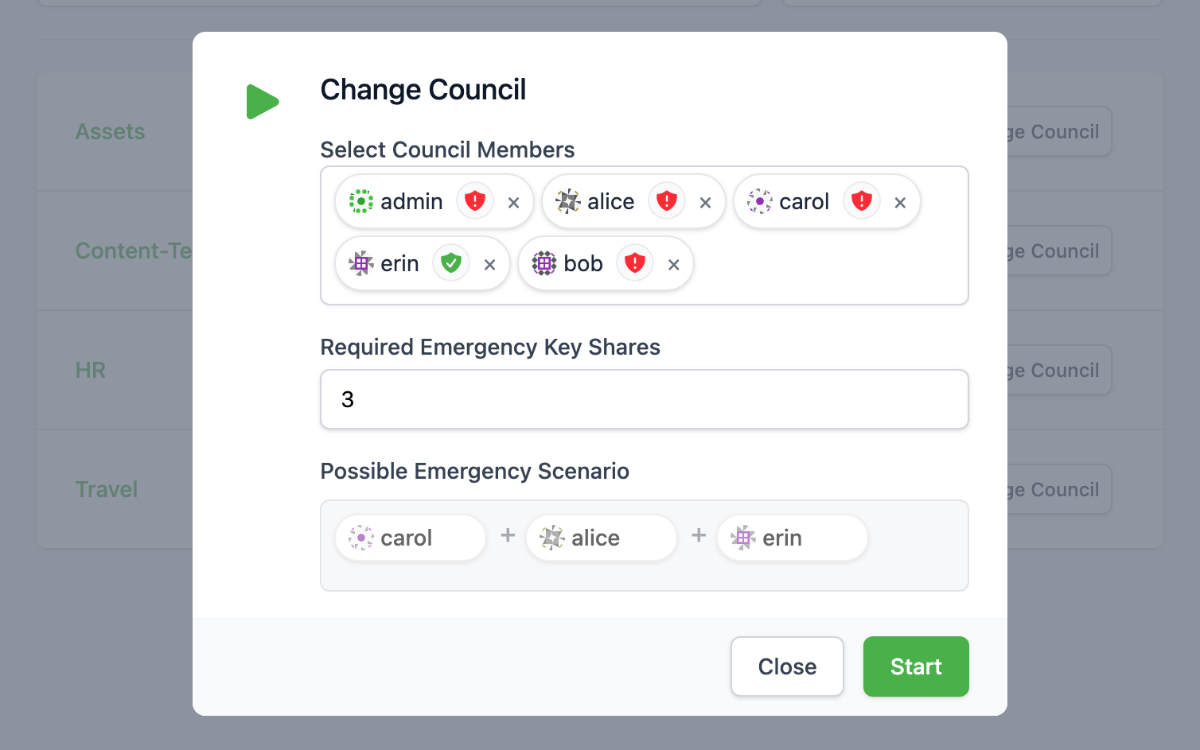
The upcoming Emergency Access feature provides a remedy here: it allows you to designate a specific group of authorized persons who can restore access to a vault, either collectively or partially, in an emergency.
Even in critical situations or in the event of personnel changes, the company remains capable of acting.
Files in Use (in the Desktop App)
A frequently expressed wish of our Hub customers: better support for collaborating on Office files.
While LibreOffice, for example, already has a built-in locking system for open files, this has been missing in Microsoft Office until now. That’s why we are currently developing our own “locking system” in the Cryptomator desktop app that recognizes when a file is already open and informs other users.
This makes collaborating on documents more conflict-free, transparent, and secure—another step toward smooth teamwork.
Two Years of Trust, Cooperation, and Security
In two years, Cryptomator Hub has evolved from an idea into a reliable platform for secure teamwork.
We would like to thank all users, administrators, and testers who have helped to further develop Cryptomator Hub with their feedback—and we look forward to the next chapter.
Cryptomator Hub 1.4.0: More Trust, More Control, More Transparency
With the release of version 1.4.0, Cryptomator Hub receives a major feature upgrade that offers more control and transparency — while also improving the overall user experience.
At the heart of this release are a new Web of Trust, finer-grained permission management, extended audit logging, and deeper insights into user profiles.
Let’s take a closer look at what’s new!
Web of Trust: Mutual Verification for Better Security
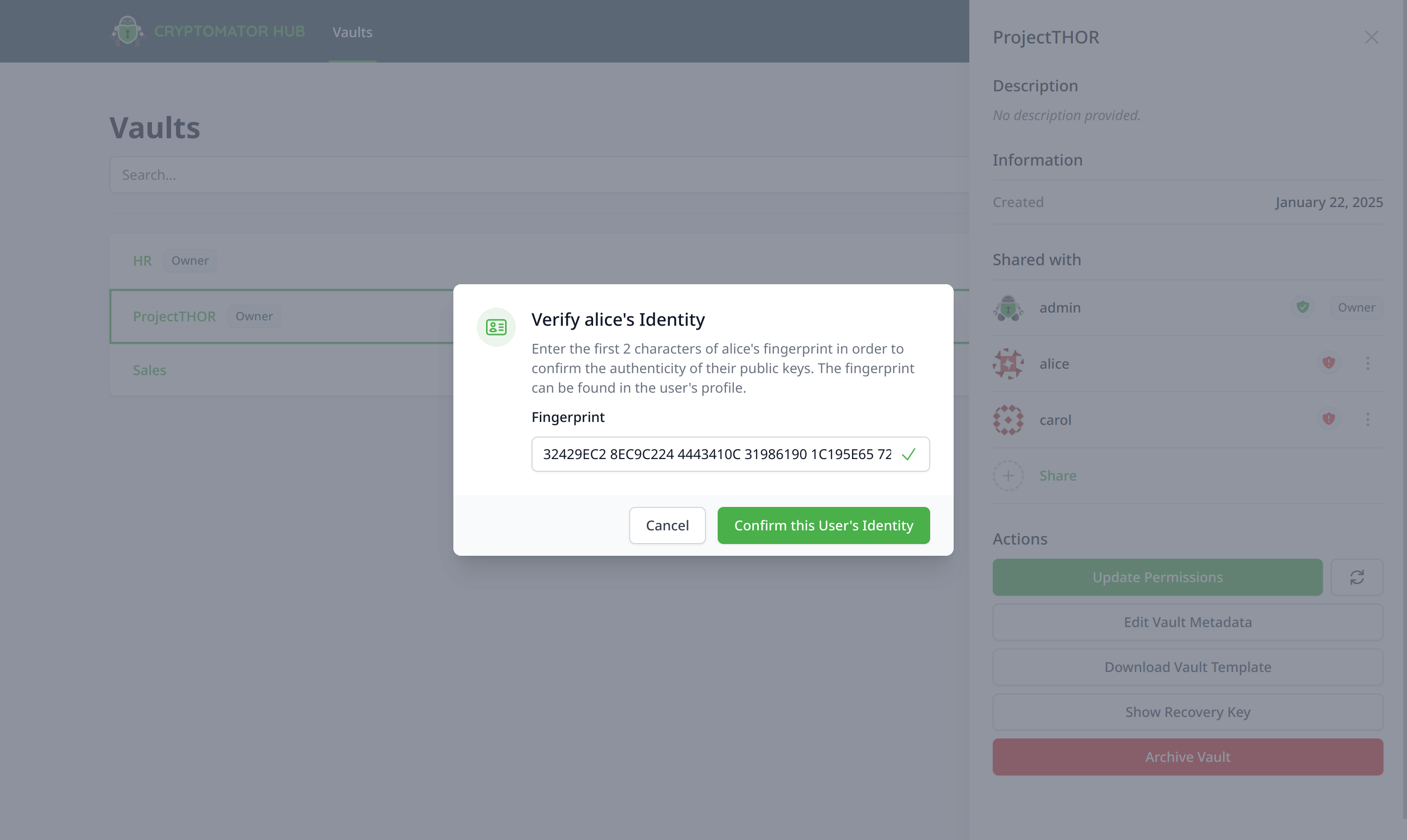
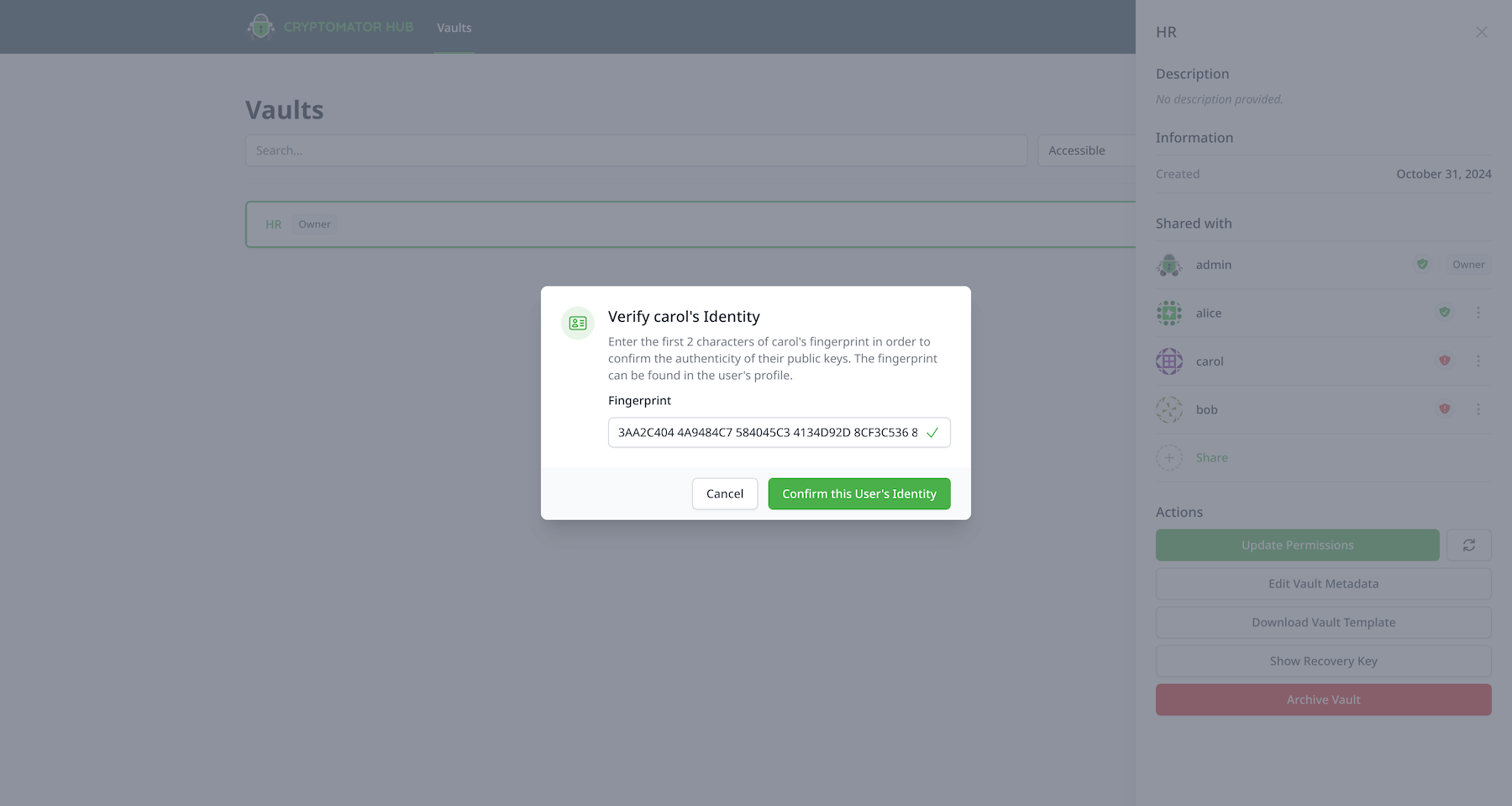
One of the highlights of this release is the new Web of Trust (WoT). Users can now mutually verify each other’s identities by signing public keys. This creates a network of trust that protects against the injection of manipulated or forged public keys.
This feature directly addresses so-called “key injection” risks and strengthens the protection of sensitive data across organizations.
The verification process is based on a simple but effective principle: Only when a person’s public key is confirmed by trusted peers is their identity considered verified.
Admins can configure how many verifications are required.
New Create-Vaults Role: Granular Permissions for Vault Creation
With the introduction of the new create-vaults role, admins now have full control over who is allowed to create new vaults within the organization.
Previously, this permission was available to all users by default — now, admins can specify whether only certain teams, individuals, or everyone should have access to this feature.
Especially in large organizations, this is a key improvement for maintaining order and managing infrastructure growth in a more controlled way.
Audit Log: Even More Precise Activity Tracking
Monitoring security-relevant actions is a key responsibility in IT operations. With version 1.4.0, the audit log becomes even more powerful:
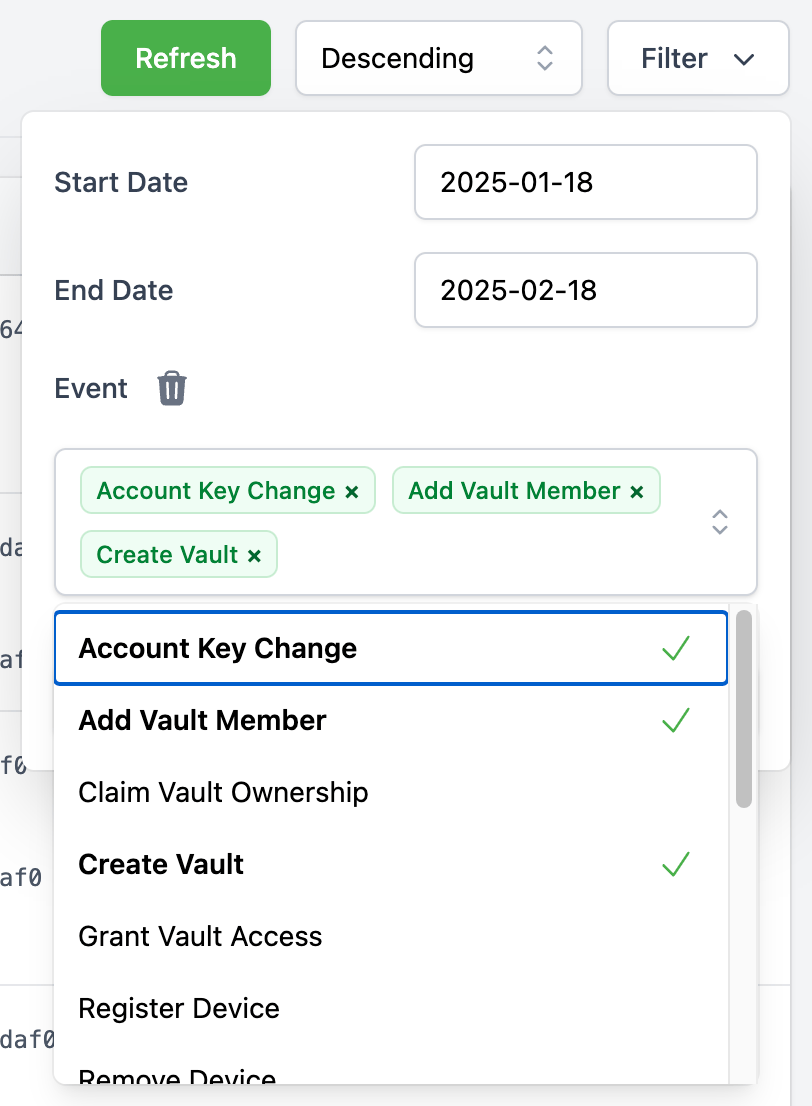
Filter by event type: You can now filter audit log entries by type — such as key changes, access attempts, or account activity — to quickly isolate relevant data during incidents.
New events: Several new event types were added to better capture security-critical actions.
Register Device – A user registered a new device, e.g., Cryptomator app or browser session.
Remove Device – A user removed a device.
Signed Identity – A user signed another user’s identity.
Account Key Changed – A user regenerated their account key, which also affects user keys.
Reset User Account – A user reset their account.
User Keys Change – A user changed their keys, e.g., during initial setup or account key updates.
Claim Vault Ownership – A user claimed ownership of a vault that was created with a Hub version prior to 1.3.0 using the Vault Admin Password.
Retrieve Vault Key event enhanced: This audit event now includes the IP address and device ID — making it easier to trace who unlocked a vault and from which device.
More Transparency in User Profile
The user interface has also been updated to offer more transparency about devices and access patterns:
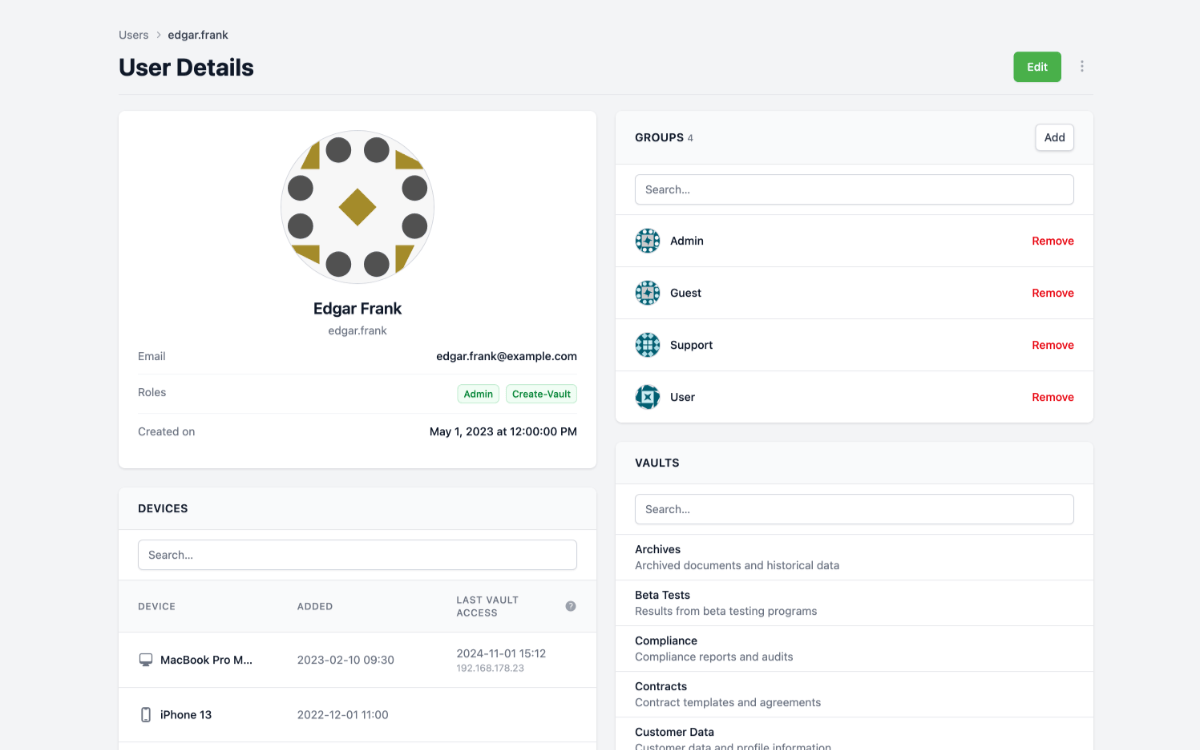
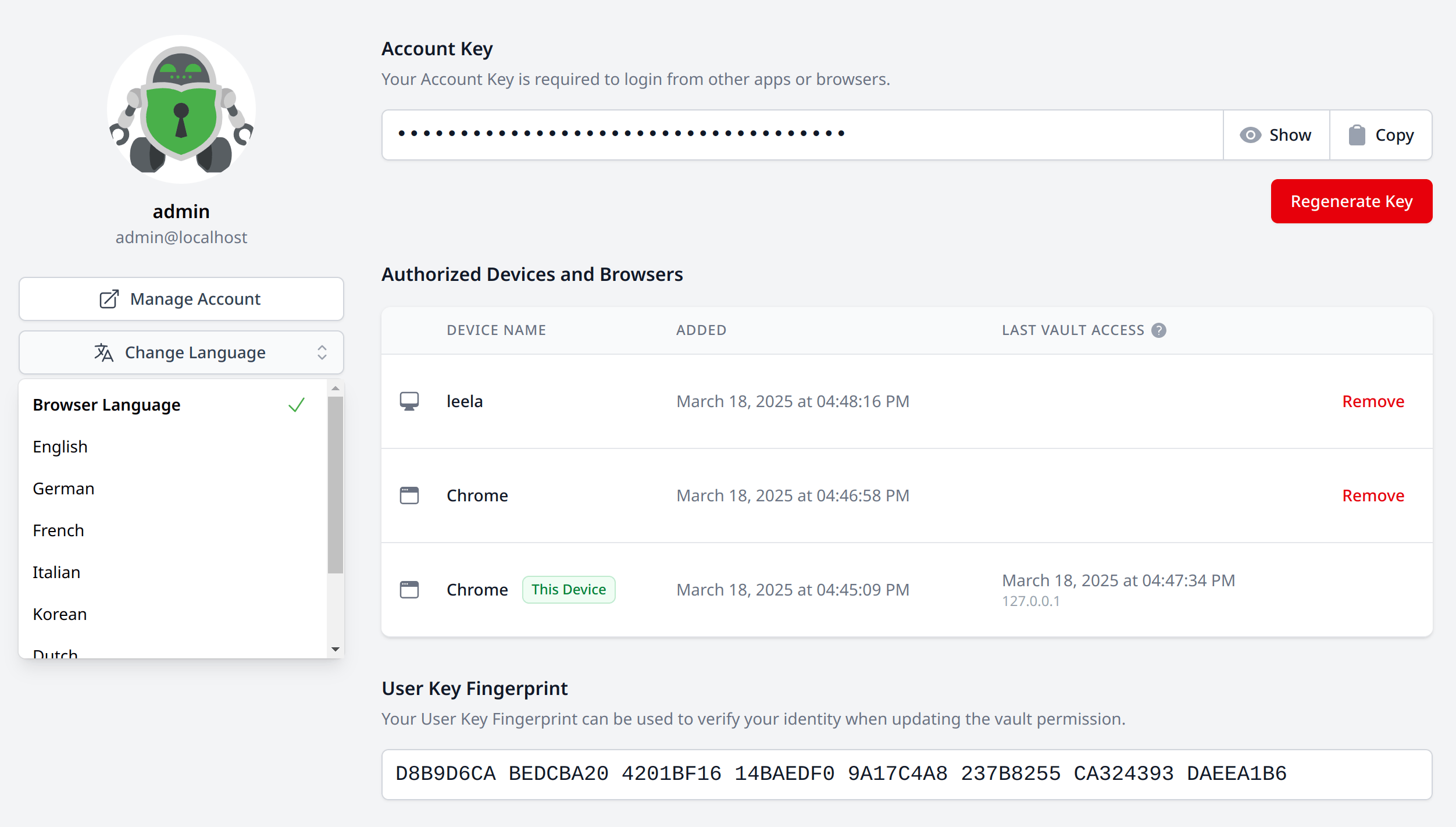
Legacy devices: Users can now see if they’re still using devices linked to vaults created with older versions of the Hub. This helps with migrations to the current user-key-based encryption introduced in version 1.3.0.
Last IP and vault access timestamp: The device overview now shows the last known IP address and the most recent vault access timestamp for each device — ideal for identifying suspicious activity.
New Languages and Improved Usability
More language support: Cryptomator Hub is now available in Dutch, French, Italian, Korean, Portuguese, and Turkish — making it even more accessible for international teams.
Language preference is preserved: Your selected language setting is now saved in your user profile and no longer resets after logout.
Provenance Attestation for Container Images
A frequently overlooked but critical area of security is the authenticity of software containers. Starting with version 1.4.0, we now publish provenance attestations for our container images.
These attestations document the origin and integrity of our images and provide additional assurance for automated deployments and CI/CD pipelines.
Full Changelog
All technical details, fixes, and improvements can be found in the release notes and the new CHANGELOG file.
Closing Remarks
Cryptomator Hub 1.4.0 is a release that builds trust — through greater visibility, more refined controls, and solid technical foundations.
Whether it’s security management, role-based permissions, or user-facing transparency: This update lays the groundwork for even more robust data infrastructures in organizations that take encryption seriously.
Cryptomator Hub Celebrates Its Second Anniversary – Test New Features in Beta Now!
It’s hard to believe that Cryptomator Hub is already two years old! As a central management platform for encrypted cloud storage solutions, Cryptomator Hub enables businesses and organizations to securely and efficiently manage access and permissions. Since its release on November 2, 2022, we’ve worked hard with our community to develop an even stronger and more secure tool to meet your needs. First of all, a huge thank you to the community! To celebrate this milestone, we’re introducing exciting new features – and the best part: you can test them now in a beta version!
“Web of Trust” – Enhanced Security through Mutual Verification
Our brand-new “Web of Trust” feature adds an extra layer of security to your Cryptomator instance. Until now, users could verify others, but now we’re taking it a step further: once a verification is made, it’s automatically signed and shared, making it possible for others to see when someone has been marked as trustworthy. This creates a network where trust and authenticity become visible.
This feature allows teams to see at a glance how trustworthy someone is within the network, based on prior verifications by other users. It’s especially beneficial for organizations that prioritize secure collaboration and high authenticity, as it makes trust visible and traceable within the platform.
“Create-Vaults Role” – Precise Control Over Vault Creation
With the “Create-Vaults Role,” admins now have the ability to precisely control who can create their own vaults within the Hub. Previously, anyone in the Hub could create new vaults, but now, permissions can be finely configured. For instance, admins can decide that only certain departments, such as IT or HR, can create new vaults. This function ensures clear structure, prevents unwanted vaults, and adapts to your organization’s unique needs. This flexibility is particularly beneficial for larger teams.
Test the Beta Now!
These features are available in the beta version and are waiting for you to try them out. Give us your feedback and help us fine-tune these functions before the official release. The full rollout is planned for the coming weeks – until then, we look forward to your support and insights!
Cryptomator Hub 1.3.0: The Account Key Update
The release of Cryptomator Hub 1.3.0 marks an exciting feature update, which introduces an Account Key for users. This update, while necessary and beneficial, will require active participation from users. Here’s what to expect during the transition from version 1.2.x to 1.3.0.
ℹ️ Preparation is Key
Before we dive into the upgrade process, ensure every vault admin secures a backup of their Vault Recovery Keys and Vault Admin Passwords. ⚠️ Doubling down on this step is critical; your backups are your safety net. Without them, our hands are tied.
⬆️ Updating Cryptomator Hub (Server) to 1.3.0
This section is only relevant for administrators who host their own Cryptomator Hub instance. If you’re using our managed service, you can skip this section. We will reach out to you to arrange a date and time to update your instance.
As mentioned above, if you’re an administrator of a self-hosted Cryptomator Hub instance, follow these steps to update Cryptomator Hub:
Back up the database. ⚠️ The importance of a working backup cannot be overstated.
Refresh your container image to the latest version: ghcr.io/cryptomator/hub:1.3.0
Skip this step if you’re using the stable tag. We will update the stable tag to point to the new version in a couple of weeks.
Implement the changes within your container orchestrator. Monitor for healthy pod statuses before proceeding.
⬆️ Updating Cryptomator (Desktop Client) to 1.11.0
Updating the Cryptomator desktop application is recommended for all users, but not technically required for now. Vaults can still be unlocked using an old version. This backward compatibility provides flexibility for a gradual rollout of the updated app. Nevertheless, making changes to access, incl. adding new members to a vault and adding new devices, requires Cryptomator 1.11.0 or higher.
🔑 Introducing Account Keys
With the updated app, users will encounter a two-step migration on their first unlock attempt:
Secure and store their new personal Account Key. ⚠️ It’s crucial for future logins from other devices.
Use the Account Key to link their Cryptomator device to their account.
This procedure is a one-time requirement for every user. It allows users to self-manage linked devices and vault owners to more easily manage access without having to frequently regrant permissions each time a user logs in from a new device.
👤 Claiming Vault Ownership and Granting Access
After updating to Hub 1.3.0, vault owners (formerly known as vault admins) are prompted to claim their vault again using the Vault Admin Password. Initially, only one user can claim ownership. Subsequently, this primary owner can grant ownership rights to others, thus eliminating the need to share the Vault Admin Password.
Once vault members have navigated through the account migration, vault owners should refresh vault permissions. This action will securely distribute the necessary vault keys to the users.
❓ Frequently Asked Questions
Q: What exactly is my Account Key? A: The Account Key is your personal secret, required for registering new devices and establishing your identity across different Cryptomator apps and browsers. Treat it with the same level of security as you would with any important password.
Q: How do I retrieve my Account Key if I lose it? A: You can retrieve your Account Key by logging into your Cryptomator Hub account and navigating to the Profile page. There, you can view your Account Key. If your browser doesn’t have access and you can’t retrieve it anymore, you can reset your account. In this case, you will lose access to all your vaults and the vault owner(s) will have to grant you access again.
Q: Will the update affect my existing vaults and the data they contain? A: No, the update will not affect your vaults or the data they contain. This update only affects the unlock process and access management, not the encrypted data itself.
Q: What happens to the Vault Admin Password after I reclaim ownership? A: Upon reclaim, the Vault Admin Password becomes obsolete. You may destroy any copies of it. Compromised Vault Admin Passwords don’t pose a threat to the security of the vault.
Q: Is the process for adding new users to a vault different? A: The difference is that you don’t grant access to each and every device, but to the user once, thanks to the Account Key. The user can link their devices to their account and access the vault from any of them without having to ask for permission again.
Q: What should I do if I encounter problems during the upgrade process? A: If you encounter any problems during the upgrade process, please contact us at [email protected].
📋 Wrapping Up
The upgrade to Cryptomator Hub 1.3.0 and Cryptomator 1.11.0 is more than a routine update. It’s a shift towards greater security and user agency. Prepare for the update by backing up essential data, and follow the outlined steps to ensure a smooth transition. Embrace the change, as it brings forward a more robust and user-friendly way to manage your vaults.
Cryptomator Hub 1.2.0: More Control and Flexibility
We’re excited to release Cryptomator Hub 1.2.0, featuring essential updates for both administrators and users. 🎉 Let’s dive into what’s new.
🗒️ Audit Logs (Premium Feature)
Our new Audit Logs feature, available with a paid license, empowers administrators with insights into user activities. Monitor vault changes, key retrievals, and other essential activities, providing an extra layer of transparency and accountability within your organization.
⚙️ Improved Vault Management
With the “Edit Vault Metadata” action, customizing vault details is now possible. You can now change the name and description of your vaults, helping you keep your vaults organized and easily identifiable. Plus, vault names no longer need to be unique, offering more flexibility.
We’ve also added the “Archive Vault” action, allowing you to remove vaults from your list. Easily reactivate archived vaults whenever needed.
👤 Streamlined User Profile Page
Our new “User Profile” page centralizes device management and user settings in one convenient location. Additionally, we’ve integrated a “Manage Account” link for users to be able to change their password and configure 2FA via Keycloak.
⬆️ Upgrade Info
Upgrading to 1.2.0 is simple. If you are on the stable lane, you just have to pull the image and restart the service. Otherwise, update the version number in your Docker Compose or Kubernetes spec file before you restart the service. Remember to always back up your data, especially before upgrading. For managed instances, rest assured, you’re already on the latest version.
⏭️ What’s Next
We’re embarking on a significant refactoring journey for our key management system in the next feature update. This update will introduce “user keys” as intermediary key pairs between vault keys and device keys. Vault owners will then grant access to users and not individual devices, which allows users to manage their devices independently.
This refactoring will deprecate vault admin passwords and introduce the vault owner role, providing a more secure and efficient way to manage your vaults.
Stay tuned for more exciting updates!
Cryptomator Hub: Managed – Request Access Now
We are happy to announce that managed instances of Cryptomator Hub are now available! 🎉 And we have released Hub 1.1.0 with recovery key support.
Request Access
First things first. 🚀 To get started, you can now request access to a managed instance of Cryptomator Hub. After your request, we will get back to you as soon as possible. Currently, some of the steps we take internally to create a managed Hub instance are still done “manually”. We are working on automating this process, but we didn’t want to delay the release any longer.
Managed vs. Self-Hosted
Managed instances of Cryptomator Hub are a great way to start using Cryptomator Hub right away without having to deploy and maintain your self-hosted instance.
Until now, you could only use the self-hosted version of Hub. This requires a lot of knowledge about how to deploy a software container using Kubernetes or Docker Compose. And if you have the knowledge, you still have to maintain the instance yourself. This includes updating the software, monitoring the instance, and keeping it secure.
With managed instances, we will take care of deploying and maintaining your Hub instance, while ensuring that your instance is highly available. You can focus on your work and your team.
This is all possible because of the underlying zero-knowledge key management. Cryptomator Hub doesn’t store unencrypted keys. All key material remains locally on the client. We can’t decrypt your data. It also helps that Hub is independent of your cloud storage provider, which means we have no access to either the key material or the cloud files.
Release 1.1.0: Recovery Key
We didn’t stop there and released Cryptomator Hub 1.1.0 with recovery key support. This allows you to access your data in case of disaster. Not only that, the recovery key is compatible with Cryptomator’s recovery key. This means you can convert your existing vaults to Hub vaults and vice versa.
What does that mean for your managed instance? If we cease to exist (we get asked this a lot, thanks to Boxcryptor 😉), you can convert your Hub vaults to “regular” password-based vaults, completely offline, so that you always have access to your data under any circumstances. This is also great for your self-hosted instance if something happens to your server.
Cryptomator Hub 1.0 Release
We are happy to announce that Cryptomator Hub, the team and enterprise solution for Cryptomator, is now ready for production use! 🎉 Huge thanks to our testers that participated in our open beta over the last 3 months for their feedback. ❤️
What is Cryptomator Hub?
In short: Cryptomator Hub adds access management for your Cryptomator vaults. It enables a secure way for you to work in teams with confidential and sensitive files for any cloud storage.
Check out our quick introduction video to learn more about the basics.
How does Cryptomator Hub work?
Cryptomator Hub is based on the same concept of a vault, a secure file storage for syncing to the cloud with end-to-end encryption. New is that Hub replaces the vault password with a central access management.
Individual access to Cryptomator vaults is secured through server-side authentication and key management. Hub manages key material based on a zero-knowledge solution without getting in touch with unencrypted keys. Learn more.
How can I get started?
The self-hosted solution is delivered as a software container and can be deployed using Kubernetes or Docker. Vist the landing page of Cryptomator Hub to get started.
Hub can be used for free for up to 5 team members. For larger teams and companies, an annual license can be purchased through the website at $6.00 per seat per month. Until the end of the year, there is a promotional discount that gives 25% off for the first year. 🎊
And as always, Cryptomator Hub is fully open source. If you have more questions, let us know in the discussion below or contact us. We are looking forward to your feedback! 🤖