Security Vulnerability in Hub Vault Unlock: Update Required
We have released an important security fix for all Cryptomator client apps, which fixes a vulnerability affecting all users who unlock Hub-managed vaults.
Required Action
Please update all your Cryptomator client applications that access Hub-managed vaults immediately to the fixed versions:
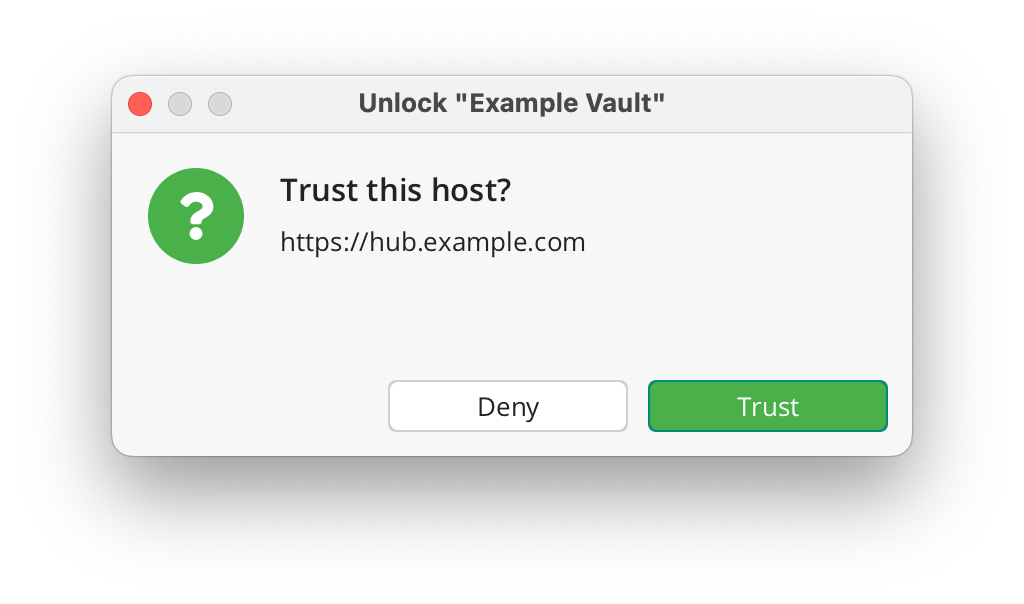
After the update, Cryptomator clients connecting to self-hosted Hub instances will show a one-time “Trust this host?” dialog that must be confirmed individually. Before accepting, please verify that the displayed Hub URL is correct and matches your Cryptomator Hub instance. Clients connecting to Cryptomator Hub Managed are not affected by this dialog, as managed domains are trusted automatically.
Are my vaults safe?
Yes. Since Cryptomator Hub uses end-to-end encryption, vault data was never in danger.
Which vaults are affected?
The vulnerability lies within the unlock workflow of Hub-managed vaults. Local vaults are unaffected.
What data is at risk?
An attacker with write access to your encrypted data could tamper the vault in a way that makes Cryptomator send a session token to a malicious server. The exfiltrated token can then be used to impersonate a user to access unencrypted information like usernames, vault names, etc. in Hub.
Has this been exploited?
At this time, we have no evidence of active exploitation of this vulnerability.
Security Advisories
As part of responsible disclosure, the full security advisories will be published on March 20. Until then, the following links will not work yet — this is expected and intentional:
If you have any further questions or need assistance during updates, don’t hesitate to contact us at [email protected].
Vulnerability in iOS Version 2.0.0–2.0.3 (Please update to 2.0.4)
We always claimed that if there once were a security issue with Cryptomator, we’d be unable to hide it. Now it happened: A user reported an issue in our iOS app that we consider severe.
While such issues can happen in any type of project (as recently demonstrated by infamous bugs in log4j and Exchange), users of open-source software can at least rely on known vulnerabilities not being kept secret for marketing purposes.
In this spirit, we want to share with you all the details of this vulnerability.
What happened?
When decrypting files for the iOS Files app, the cleartext file needs to be physically stored on the file system and a path leading to this file is handed over to the Files app.
If iCloud Backup is enabled on this device, the cleartext file is included in the backup, effectively leaking it to Apple.
What files are affected?
Only files that you actually opened from within the Files app have been decrypted. All remaining vault contents are unaffected.
Furthermore, the device needs to have made an iCloud Backup while a vulnerable version has been in use (2.0.0 released 2021-12-21, fixed in 2.0.4 released 2021-12-26).
If iCloud Backup is disabled, no decrypted files left your device.
Can leaked files be deleted from existing backups?
Yes, the vaults themselves are still fully protected, regardless of which cloud storage is being used.
Why is there decrypted data in the first place?
At some point, you need to have cleartext data, otherwise you can’t work with them. Cryptomator is fully integrated into the Files app, which means that it is bound to and limited by the File Provider Extension API. It requires to have readable (cleartext) data readily available. Keep in mind that Cryptomator’s target is to ensure privacy in the cloud and not on the device itself.
Are there any other plans regarding the local cache?
We are currently investigating if we can shorten the lifetime of decrypted data. As mentioned before, mechanisms that affect the File Provider Extension are out of our hands. But for example, clearing the cache after the vault has been locked in combination with auto-lock can certainly be helpful if you’d like to tighten the longevity of decrypted data.
How does the development team make sure to avoid issues?
While claiming to write bug-free software would be a blatant lie, we can promise to do our best to avoid such vulnerabilities.
But all the best practices, automated code analysis, highest test coverage and consulting external experts doesn’t help to rule out all possibilities, especially when caused by interaction with a third-party tool.
The rewritten iOS app has been tested by more than 2,300 beta testers over a period of half a year. After all, it was just very bad luck that this issue has not been discovered during this beta.